---
name: lit-and-monaco-editor
description: Learn how to create a Lit web component that wraps the Monaco Editor (powering VSCode) to add a fully functional code editor to your web applications.
metadata:
url: https://rodydavis.com/posts/lit-monaco-editor
last_modified: Tue, 03 Feb 2026 20:04:19 GMT
---
# Lit and Monaco Editor
In this article I will go over how to set up a [Lit](https://lit.dev/) web component and use it to wrap the [Monaco Editor](https://microsoft.github.io/monaco-editor/) that powers [VSCode](https://code.visualstudio.com/).
> **TLDR** You can find the final source [here](https://github.com/rodydavis/lit-code-editor) and an online demo [here](https://rodydavis.github.io/lit-code-editor/).
To learn how to build an extension with VSCode and Lit check out the blog post [here](https://rodydavis.com/posts/lit-vscode-extension/).
## Prerequisites
* Vscode
* Node >= 16
* Typescript
## Getting Started
We can start off by navigating in terminal to the location of the project and run the following:
```
npm init @vitejs/app --template lit-ts
```
Then enter a project name `lit-code-editor` and now open the project in vscode and install the dependencies:
```
cd lit-code-editor
npm i lit monaco-editor
npm i -D @types/node
code .
```
Update the `vite.config.ts` with the following:
```
import { defineConfig } from "vite";
import { resolve } from "path";
export default defineConfig({
base: "/lit-code-editor/",
build: {
rollupOptions: {
input: {
main: resolve(__dirname, "index.html"),
},
},
},
});
```
## Template
Open up the `index.html` and update it with the following:
```
Lit Code Editor
```
We are setting up the `lit-element` to have a slot which will be the code for the editor to start with. The language can be set with the type or adding an attribute to the `code-editor` component.
## Web Component
Before we update our component we need to rename `my-element.ts` to `code-editor.ts`
Open up `code-editor.ts` and update it with the following:
```
import { css, html, LitElement } from "lit";
import { customElement, property } from "lit/decorators.js";
import { createRef, Ref, ref } from "lit/directives/ref.js";
// -- Monaco Editor Imports --
import * as monaco from "monaco-editor";
import styles from "monaco-editor/min/vs/editor/editor.main.css";
import editorWorker from "monaco-editor/esm/vs/editor/editor.worker?worker";
import jsonWorker from "monaco-editor/esm/vs/language/json/json.worker?worker";
import cssWorker from "monaco-editor/esm/vs/language/css/css.worker?worker";
import htmlWorker from "monaco-editor/esm/vs/language/html/html.worker?worker";
import tsWorker from "monaco-editor/esm/vs/language/typescript/ts.worker?worker";
// @ts-ignore
self.MonacoEnvironment = {
getWorker(_: any, label: string) {
if (label === "json") {
return new jsonWorker();
}
if (label === "css" || label === "scss" || label === "less") {
return new cssWorker();
}
if (label === "html" || label === "handlebars" || label === "razor") {
return new htmlWorker();
}
if (label === "typescript" || label === "javascript") {
return new tsWorker();
}
return new editorWorker();
},
};
@customElement("code-editor")
export class CodeEditor extends LitElement {
private container: Ref = createRef();
editor?: monaco.editor.IStandaloneCodeEditor;
@property() theme?: string;
@property() language?: string;
@property() code?: string;
static styles = css`
:host {
--editor-width: 100%;
--editor-height: 100vh;
}
main {
width: var(--editor-width);
height: var(--editor-height);
}
`;
render() {
return html`
`;
}
}
declare global {
interface HTMLElementTagNameMap {
"code-editor": CodeEditor;
}
}
```
Here we are just setting up some boilerplate to set up the [web workers with vite](https://vitejs.dev/guide/features.html#web-workers) and passing the reference from the container element to the template using the [ref directive](https://lit.dev/docs/templates/directives/#ref).
The styles from monaco editor are also passed as a style element load in the shadow root.
Now let's add some helper methods for accessing the code and language provided:
```
private getFile() {
if (this.children.length > 0) return this.children[0];
return null;
}
private getCode() {
if (this.code) return this.code;
const file = this.getFile();
if (!file) return;
return file.innerHTML.trim();
}
private getLang() {
if (this.language) return this.language;
const file = this.getFile();
if (!file) return;
const type = file.getAttribute("type")!;
return type.split("/").pop()!;
}
private getTheme() {
if (this.theme) return this.theme;
if (this.isDark()) return "vs-dark";
return "vs-light";
}
private isDark() {
return (
window.matchMedia &&
window.matchMedia("(prefers-color-scheme: dark)").matches
);
}
```
These methods are checking the slot for the script tag with the language provided or looking for a property set on `code-editor` and then returning the value.
Now let's attach the editor to the container reference:
```
firstUpdated() {
this.editor = monaco.editor.create(this.container.value!, {
value: this.getCode(),
language: this.getLang(),
theme: this.getTheme(),
automaticLayout: true,
});
window
.matchMedia("(prefers-color-scheme: dark)")
.addEventListener("change", () => {
monaco.editor.setTheme(this.getTheme());
});
}
```
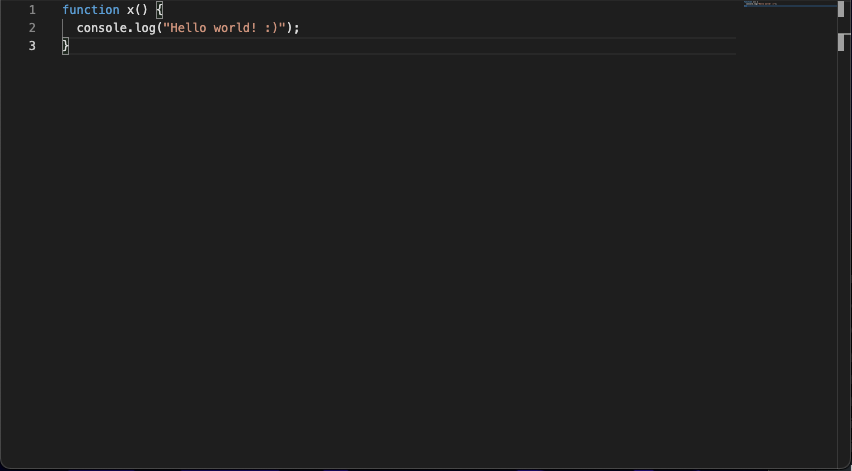
Now the editor should be running and able to be interacted with:
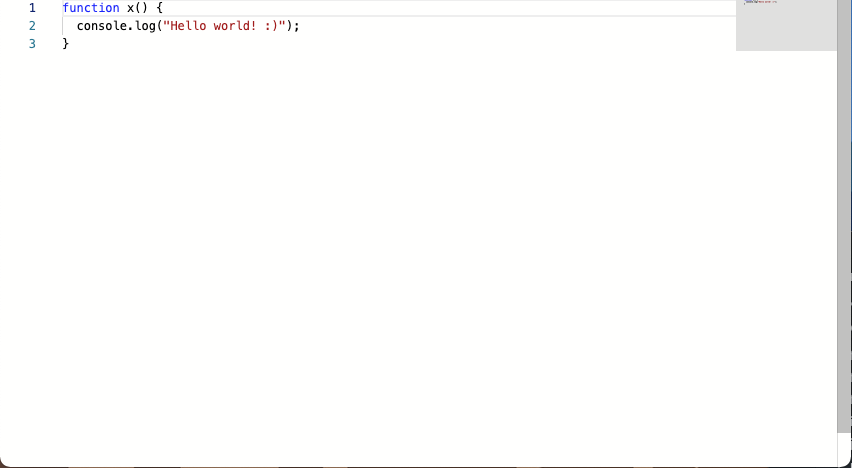
When the system changes to dark mode it will [switch](https://developer.mozilla.org/en-US/docs/Web/CSS/@media/prefers-color-scheme) as well!
To get and set the value from the editor we can add 2 helper methods:
```
setValue(value: string) {
this.editor!.setValue(value);
}
getValue() {
const value = this.editor!.getValue();
return value;
}
```
Everything should work as expected now and the final code should look like the following:
```
import { css, html, LitElement } from "lit";
import { customElement, property } from "lit/decorators.js";
import { createRef, Ref, ref } from "lit/directives/ref.js";
// -- Monaco Editor Imports --
import * as monaco from "monaco-editor";
import styles from "monaco-editor/min/vs/editor/editor.main.css";
import editorWorker from "monaco-editor/esm/vs/editor/editor.worker?worker";
import jsonWorker from "monaco-editor/esm/vs/language/json/json.worker?worker";
import cssWorker from "monaco-editor/esm/vs/language/css/css.worker?worker";
import htmlWorker from "monaco-editor/esm/vs/language/html/html.worker?worker";
import tsWorker from "monaco-editor/esm/vs/language/typescript/ts.worker?worker";
// @ts-ignore
self.MonacoEnvironment = {
getWorker(_: any, label: string) {
if (label === "json") {
return new jsonWorker();
}
if (label === "css" || label === "scss" || label === "less") {
return new cssWorker();
}
if (label === "html" || label === "handlebars" || label === "razor") {
return new htmlWorker();
}
if (label === "typescript" || label === "javascript") {
return new tsWorker();
}
return new editorWorker();
},
};
@customElement("code-editor")
export class CodeEditor extends LitElement {
private container: Ref = createRef();
editor?: monaco.editor.IStandaloneCodeEditor;
@property() theme?: string;
@property() language?: string;
@property() code?: string;
static styles = css`
:host {
--editor-width: 100%;
--editor-height: 100vh;
}
main {
width: var(--editor-width);
height: var(--editor-height);
}
`;
render() {
return html`
`;
}
private getFile() {
if (this.children.length > 0) return this.children[0];
return null;
}
private getCode() {
if (this.code) return this.code;
const file = this.getFile();
if (!file) return;
return file.innerHTML.trim();
}
private getLang() {
if (this.language) return this.language;
const file = this.getFile();
if (!file) return;
const type = file.getAttribute("type")!;
return type.split("/").pop()!;
}
private getTheme() {
if (this.theme) return this.theme;
if (this.isDark()) return "vs-dark";
return "vs-light";
}
private isDark() {
return (
window.matchMedia &&
window.matchMedia("(prefers-color-scheme: dark)").matches
);
}
setValue(value: string) {
this.editor!.setValue(value);
}
getValue() {
const value = this.editor!.getValue();
return value;
}
firstUpdated() {
this.editor = monaco.editor.create(this.container.value!, {
value: this.getCode(),
language: this.getLang(),
theme: this.getTheme(),
automaticLayout: true,
});
window
.matchMedia("(prefers-color-scheme: dark)")
.addEventListener("change", () => {
monaco.editor.setTheme(this.getTheme());
});
}
}
declare global {
interface HTMLElementTagNameMap {
"code-editor": CodeEditor;
}
}
```
## Usage
To use this component it can have the code provided by slots:
```
```
Or for properties:
```
```
Or both:
```
```
The theme can also be manually set:
```
```
## Conclusion
If you want to learn more about building with Lit you can read the docs [here](https://lit.dev/).
The source for this example can be found [here](https://github.com/rodydavis/lit-code-editor).